 SmallerIn testing
Big video.
Smaller copy.
Make your video easier to send. Choose a maximum file size, compress on your device, and preview the result before sharing.
Currently in TestFlight testing. Not yet available on the public App Store.
For iPhone and iPad with iOS / iPadOS 17 or later.
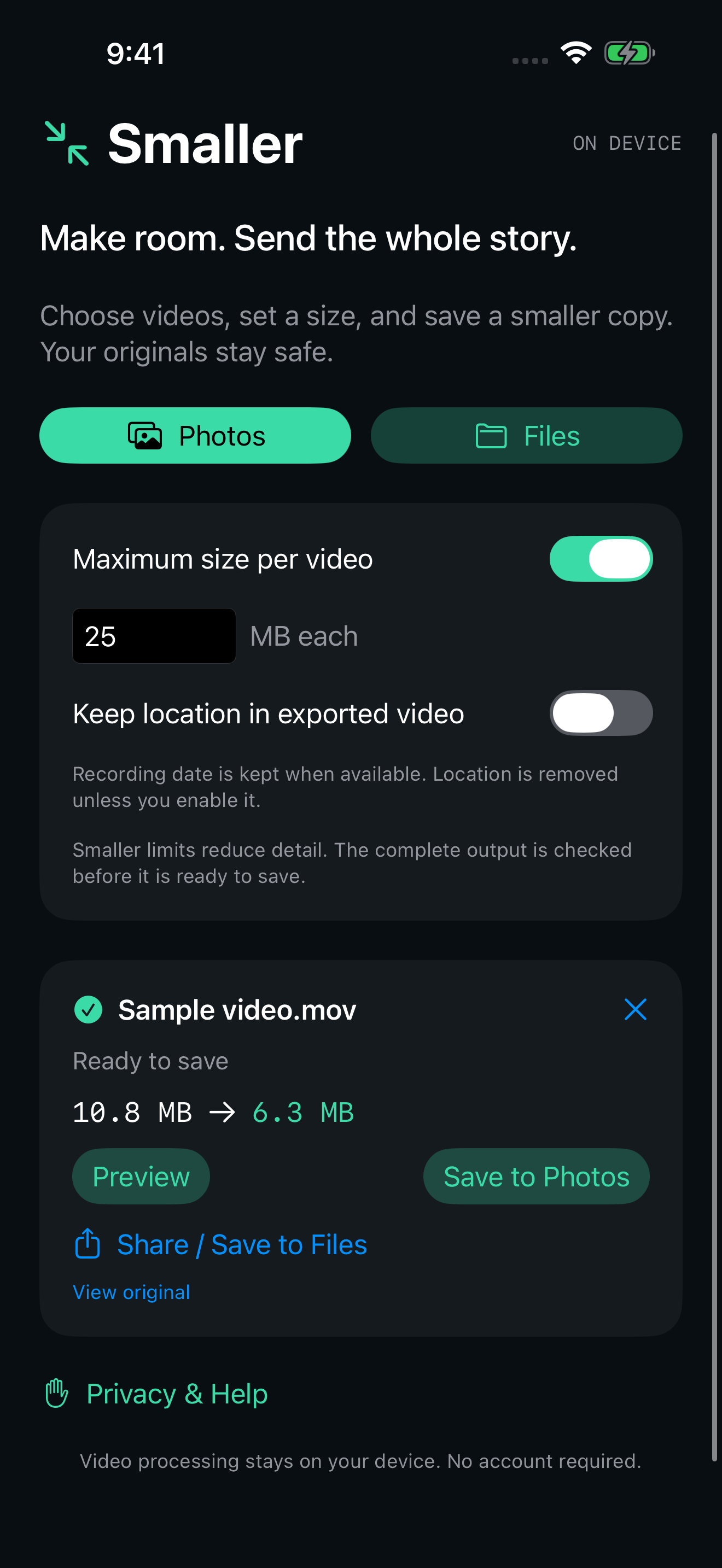
Choose a size.
Set a maximum MB per video, or use Balanced compression. Process several videos, one at a time.
Preview the result.
Check the picture and sound, and compare the file sizes before you save or share.
Keep it on device.
The compression runs on your iPhone or iPad. No app account or compression upload server.
A LITTLE CLARITY GOES A LONG WAY
Your original
stays unchanged.
Smaller creates a separate video. You decide what to keep.
Save your new copy to Photos, save it to Files, or send it using the system share sheet. The app doesn’t delete your original or automatically clean your photo library.
Compression can reduce detail. Very small targets aren’t always possible, and the result depends on the source video. Keep Smaller open while it works, and allow room for the imported video and its output.
Read the compression guide ↗PRIVACY, IN PLAIN LANGUAGE
Your videos deserve care.
The current test version has no production ads or independent analytics SDK. Location metadata is removed from the exported copy by default, with an option to keep it. Cloud imports and your chosen sharing destinations follow their own settings.